
Part 1 of the series A privacy tool that refuses to decide for you
Never auto-delete, always auto-flag: a privacy tool that leaves the decision to you
A scanner that finds sensitive notes in a family tree could delete them for you. Mine only flags them, puts them in a spreadsheet for a person to decide, then writes a new file. Why, and how the code makes 'the original is never touched' true.
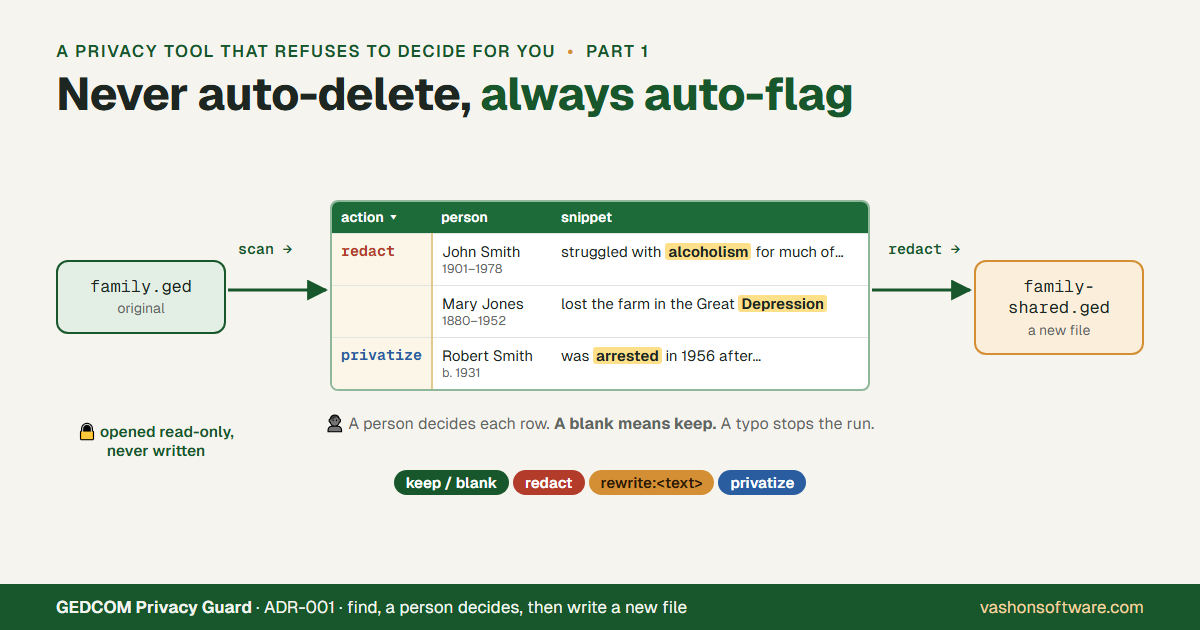
GEDCOM Privacy Guard scans a family-tree export (a GEDCOM file) for notes that shouldn’t be shared: a living cousin’s diagnosis, an arrest, a rumor written down as fact. Genealogists upload these files to FamilySearch, Ancestry and family websites, and the notes go along with everything else unless someone reads every one first.
The tool could remove what it finds. It doesn’t. Its first decision record, ADR-001, says so in five words: never auto-delete, always auto-flag. It finds, a person decides, and only then does it write a new file. This post covers why, the unusual choice of review screen (a spreadsheet), and the code that makes “the original is never touched” true rather than just a hope.
Why not just delete the matches?
Auto-redaction is the simpler design. Match a rule, remove the text, done. It’s also the design that destroys research without anyone noticing.
Take the test file’s first person, an invented John Smith (1901–1978):
John struggled with alcoholism for much of his adult life, according to family lore he was institutionalized briefly in 1938. This is unverified and should be checked against county records.
That note should be flagged twice: an addiction and an unverified claim. But “institutionalized” could just as well describe an orphanage, a prison or a college, and the tool’s first real scan flagged “the Great Depression” as mental health (part 2 of this series is about those). A keyword match doesn’t understand context. An automatic deletion on a false positive is a silent data-loss bug in decades of research, found years later, if ever.
The two kinds of error aren’t equal. A false positive in a review list costs the reviewer two seconds to mark “keep.” A false positive in an auto-redactor costs the note. So the tool takes the expensive-to-build path (a review step) because it’s the only safe default for an edit nobody can undo.
ADR-001 binds everything later too: every interface, the future web version included, must show a review step before anything is rewritten, and any new scanner (an AI one included) feeds the same flag-then-review flow rather than bypassing it.
A file between two commands
The review step isn’t a prompt that asks “are you sure?”. It’s a file:
gedcom-privacy-guard scan   family.ged --out review.xlsx
   (you open review.xlsx and fill in the "action" column)
gedcom-privacy-guard redact family.ged --report review.xlsx --out family-shared.ged
Two commands with a checkpoint between them. You can close the laptop between them, send the spreadsheet to a cousin who knows that branch, and come back next week. The decision lives in a file you can read, keep and compare, not in a dialog that’s gone once it’s clicked.
A spreadsheet as the review screen
I didn’t build a GUI for reviewing. The report is a spreadsheet, and that was deliberate: Excel or Google Sheets is a fine review screen for a few hundred rows, every genealogist already has one, and it sorts, filters and saves with no code of mine.
It started as plain CSV. A real scan of a 491-person tree (22 flags, several of them false
positives) showed the gap: the reader had to read each 200-character snippet closely to find
what had tripped the flag. CSV can’t highlight a word inside a cell, so ADR-006 switched the
report to .xlsx, with the matched term in bold color inside the snippet. The cost was one
dependency (openpyxl); nothing else read the CSV, so I dropped it rather than keep two formats.
The layout follows the decision. action is the first column, frozen with the header,
with a dropdown. Next comes what you need to decide: the name, where the text was found,
severity, category and the highlighted snippet. Then the details that tell same-named
relatives apart (dates, parents, spouses, FamilySearch and Find a Grave IDs), taken only from
the file, never guessed. The redactor’s bookkeeping (xref, line, line_end) goes last.
Four actions, and a blank means keep
| Action | What happens to the text |
|---|---|
keep (or blank) | Nothing |
redact | The whole text becomes [REDACTED] |
rewrite:<text> | The whole text becomes your wording |
privatize | Only the matched words are wrapped in [[ ]], Legacy’s own privacy marker (part 3) |
A blank action means keep. That’s the other half of “never auto-delete”: a row you skipped
changes nothing. Anything else in the column (a typo like redcat) stops the run with a
message naming the person and line. The tool won’t guess what you meant.
One rule leans the other way, and it’s worth saying why. When several rows point at the same
note with different actions, the strongest wins: redact over rewrite over privatize over
keep. That isn’t the tool deciding; each of those actions was chosen by a person. It’s how two
human decisions are combined, and when they conflict, leaving too much in is the worse mistake.
A spreadsheet invites probing
Choosing a spreadsheet as the interface brings a spreadsheet’s risks. GEDCOM text is
untrusted input, and in Excel a cell that starts with =, +, - or @ is a formula. A
note reading =HYPERLINK(...) would turn into a live link in the reviewer’s spreadsheet.
So every cell is written as text, never as a formula. Values that start with one of those characters (or a tab or carriage return) are forced to text, with a test that feeds them in and checks what comes out. The FamilySearch and Find a Grave links are built only from IDs that match the expected format; anything else leaves the cell blank instead of becoming a URL.
Making “never touched” true in code
“The original is never modified” is easy to write in a README. It was true of the normal path
from the start: redact reads the input and writes a new file. But until this October,
nothing stopped you from typing the input’s own name as --out. A privacy tool with a gap
like that shouldn’t make the claim, so I held this post until the code enforced it:
- Neither command writes over its inputs.
redactrefuses an--outthat is the GEDCOM or the review spreadsheet, compared as files (os.path.samefile), not as strings, so.\family.gedandD:\Trees\family.gedcount as the same file. scanwon’t replace an existing report without--force. Your half-finished review doesn’t vanish because you ran the scan again.- The spreadsheet must match the file. Before changing anything,
redactchecks that every row’s line numbers still point at the same text the scan found. A report from a different export, or from before you edited the tree, stops the run with no output, rather than rewriting whatever now sits on those lines. - Unchanged text stays byte-for-byte as it was: names, dates and places pass through, and the input’s line endings are kept.
Each rule has a test (test_redact_refuses_to_overwrite_its_inputs,
test_values_are_never_formulas and others), so the claim fails the build if it stops being
true.
That makes the workflow safe to repeat. scan only reads, so run it as often as the tree
changes. redact runs every check before it opens the output, so a bad action or a stale
report costs an error message and a second try, not a half-written file.
The general lesson
When a tool’s mistakes can’t be undone, automate the finding and leave the deciding to a person. Put the decision in a file, not a dialog, so it can wait, be shared and be checked. Use the screen people already have when it’s good enough, then defend it like any other input. And when the safety promise is the product, don’t publish the promise until the code enforces it and a test proves it.
The code is at github.com/VashonSoftware-com/gedcom-privacy-guard, MIT-licensed, and in beta. Testers with exports from programs other than Legacy are especially welcome.
Behavior described is as of 2026-10-29. The example note is from the tool’s invented test file; no real family notes are quoted, and the 491-person scan is reported as counts only. I worked through this with Claude (Anthropic’s AI model) as a pair: it helped write the decision records, the hardening tests and this post. The decisions are mine, and I reviewed every change.